
Running a growing industrial business on Excel sheets?
Our client was too.

At first, it worked- simple, easy, and familiar. But as more orders, custom jobs, and client changes piled up, things started getting complicated. Costing errors, delivery delays, tracking confusion and a constant fear of “what if someone deletes the wrong file?”

That’s when they realized: Excel was holding them back. They needed something smarter, faster, and built for their kind of work.

That’s where we stepped in, building a custom ERP system that changed everything.

Here’s the full story.
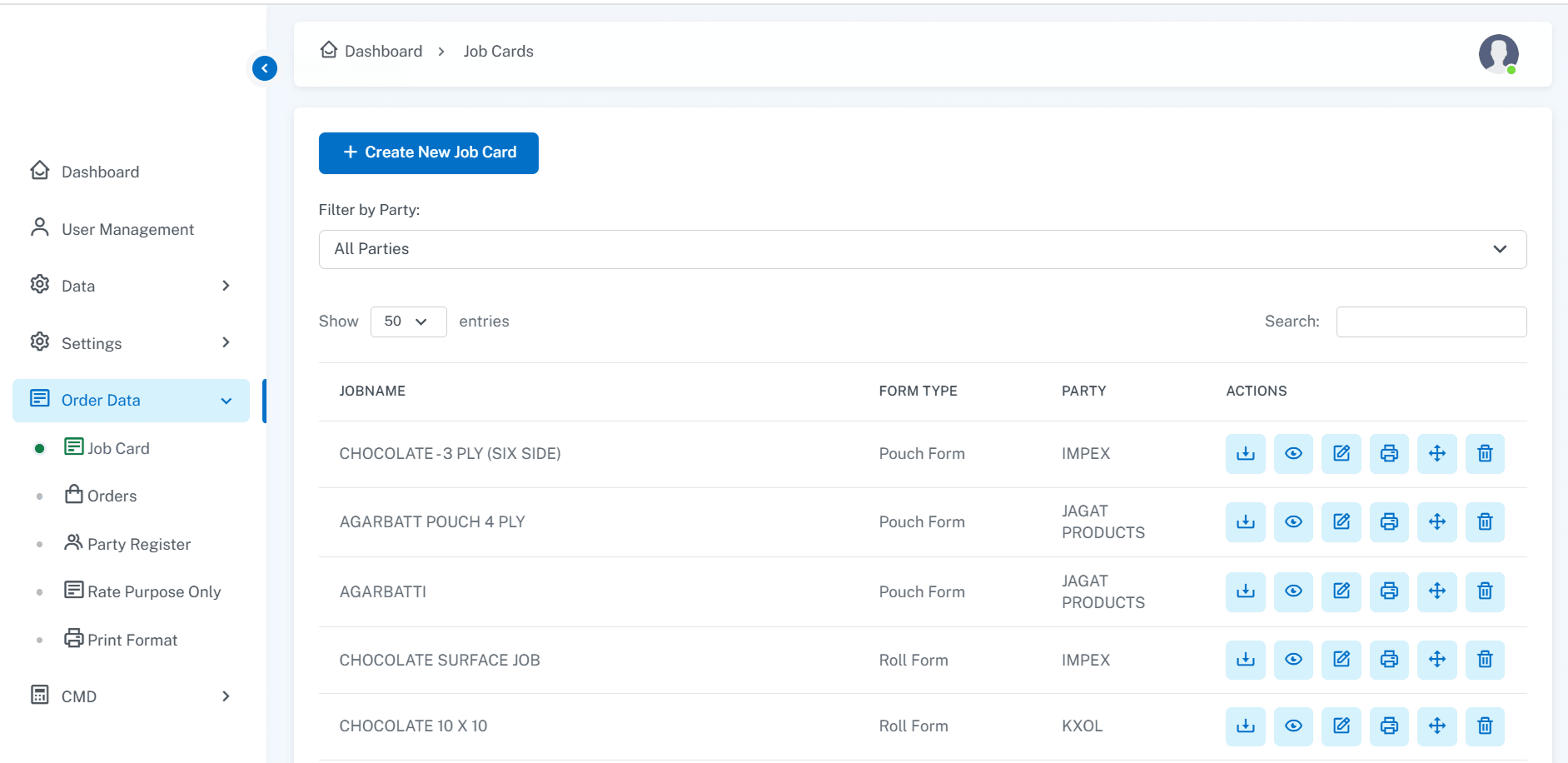
Why industrial companies need custom ERP systems, developed by raindrops infotech.

The Common Problem in Industrial Sectors

Most medium to large-scale factories, especially in packaging, manufacturing, and industrial production, still manage key operations through manual processes or Excel sheets. At first, it seems easy:

  • point-icon

    Maintain job cards manually

  • point-icon

    Track costing in spreadsheets

  • point-icon

    Issue invoices by hand

  • point-icon

    Depend on specific employees for managing codes and processes

But what happens when those key employees leave? Or when the data becomes too messy to manage? Or when clients start expecting real-time updates and faster operations?

That’s when businesses realize that they need a solid ERP system.

Meet Our Client: A Leader in Flexible Packaging

Our client is a major player in flexible packaging, supplying pouches and packaging materials to big brands like Everest Masala, Balaji, and many others. Their factory produces different types of plastic pouches, laminated rolls, and packaging materials customized for each client’s specific needs like:

  • point-icon

    Material thickness

  • point-icon

    Size specifications

  • point-icon

    Design requirements

Earlier, they managed everything manually through Excel, but it was becoming a nightmare as they scaled up.

The biggest challenge?

Every time a manager resigned, a huge knowledge gap was created. Processes weren’t documented systematically, and new hires took months to understand the flow. They needed a way to systematize their operations, without depending on individual memory or Excel sheets.

The ERP Solution We Designed (Simple, Powerful, and Custom)

We didn’t just build a generic ERP. We custom-built an ERP system specifically tailored to their industry and workflow. Here’s what we implemented:

Job Card Management

  • Every order (like 1000 pouches of Everest Masala) generates a job card.
  • The job card tracks material used, thickness, size, and special instructions.

Costing and Rate Calculator

  • Automated rate calculation based on material type, size, and quantity.
  • No need to manually check or guess costing anymore.

Invoicing Integration

  • Once costing is finalized, invoices are generated automatically.
  • No back-and-forth between finance and operations.

Cylinder Calculation and Line Reference Tracking

  • For printing and packaging, cylinder data is automatically calculated and linked.

Material Management

  • Different materials (like plastic grades) are tracked precisely.
  • Variations in material type are reflected in costing and production tracking.

Profitability Reports

  • Managers can instantly check how much material was used, cost involved, and profit earned per job.

Plus, we converted all their traditional Excel-based systems into a secure, web-based ERP, so no more juggling with hundreds of scattered spreadsheets!

How would this help their business?

By implementing a custom ERP system for industrial companies, [Client Name] is set to unlock major improvements across their operations. Here’s how:
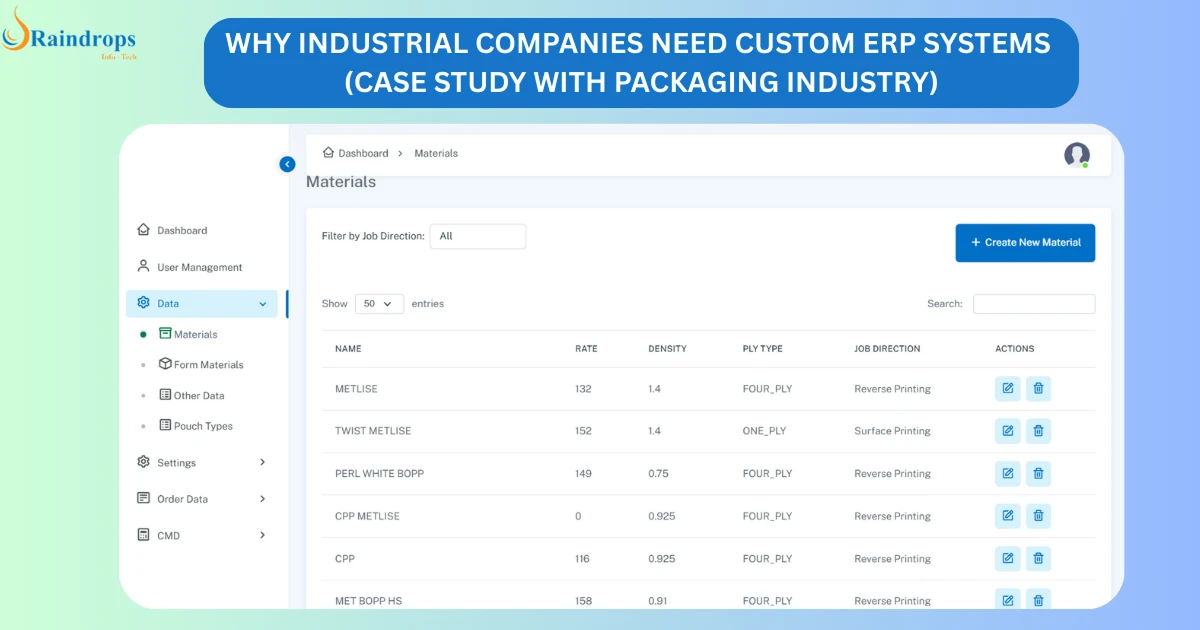

Order details of custom ERP system developed by raindrops infotech.
discover-more-slide-shape

1. Productivity Will Increase Significantly

discover-more-slide-shape

With automation and real-time insights, the teams would be able to handle more orders without feeling overwhelmed. Key advantages they can expect:

  • point-icon

    Fewer Errors: Costing mistakes, job tracking confusion, and material mismanagement will reduce drastically.

  • point-icon

    Better Planning: Production schedules can be created based on actual capacity insights and not guesswork.

Moving away from their current ERP for Excel-based operations will remove bottlenecks and manual slip-ups.

2. Lower Employee Dependency

discover-more-slide-shape

Today, every time a new employee joins, weeks are spent training them on complex Excel processes. With a custom ERP for packaging industry:

  • point-icon

    Standardized workflows will guide employees step-by-step.

  • point-icon

    New joiners will require less handholding.

  • point-icon

    Critical knowledge won’t be trapped inside a few senior employees’ heads anymore.

The ERP system will act as an internal trainer, reducing dependency and improving business continuity.

3. Faster Client Service and Better Turnaround

discover-more-slide-shape

Speed = client satisfaction = more business. With a well-designed industrial ERP software India, the client would:

  • point-icon

    Share quotations and cost estimates in minutes.

  • point-icon

    Provide real-time updates on job status to customers.

  • point-icon

    Plan deliveries faster, with better coordination across production and dispatch.

This responsiveness would strengthen client trust and increase repeat orders.

4. Improved Data Security

discover-more-slide-shape

Currently, their critical data is scattered across Excel files on different systems which is a huge risk. Implementing a centralized ERP system will:

  • point-icon

    Protect business data with role-based access control.

  • point-icon

    Offer regular auto-backups to prevent accidental losses.

  • point-icon

    Safeguard intellectual assets like pricing models, customer details, and vendor contracts.

Security won’t be an afterthought anymore , it will be built into daily operations.

What a Custom ERP System Brings to the Table?

  • point-icon

    Standardization Across Your Processes: A custom ERP for packaging industry or manufacturing units enforces consistent, standardized workflows across departments.Everyone follows the same process, leading to fewer errors, faster execution, and better scalability.

  • point-icon

    Visibility Across Departments: When departments work in silos using disconnected Excel files, small miscommunications can snowball into big losses. An industrial ERP software India connects all teams onto a single platform. Sales, production, inventory, and management all stay aligned in real time.

  • point-icon

    Real-Time Data for Faster Decision-Making: With Excel, decision-makers often act on outdated information. An ERP system provides live dashboards and automatic reports, helping management identify issues early, allocate resources efficiently, and respond faster to market changes.

  • point-icon

    Security for Your Intellectual Assets: Your costing strategies, customer databases, material sourcing methods: these are critical business assets. With a centralized ERP, you safeguard sensitive data with advanced security protocols, ensuring it is accessible only to authorized personnel. The risk of data loss due to accidental file deletion, employee turnover, or cyber threats is significantly reduced.

  • point-icon

    Better Client Service and Accelerated Growth: With a streamlined ERP system, quotations are sent faster, orders are fulfilled more accurately, and delivery schedules are managed seamlessly. This leads to improved client satisfaction and opens up new growth opportunities.

What a Custom ERP System Brings to the Table?

This project clearly proves one thing: A customized ERP is not a luxury, it’s a business necessity for industrial companies aiming for sustainable, scalable growth. Whether you are a factory in Gujarat, Maharashtra, or any other industrial hub in India, if your operations are still running on Excel sheets, you are holding your business back.

It is time to eliminate inefficiencies, reduce risks, and prepare your business for the future with a robust, industry-specific ERP solution.

At Raindrops Infotech, we specialize in building custom ERP systems for industrial companies, suited to your exact processes, materials, and client demands. Ready to transform your business operations? Schedule a free consultation with us today to discuss how we can help you achieve higher productivity, stronger data security, and faster growth.

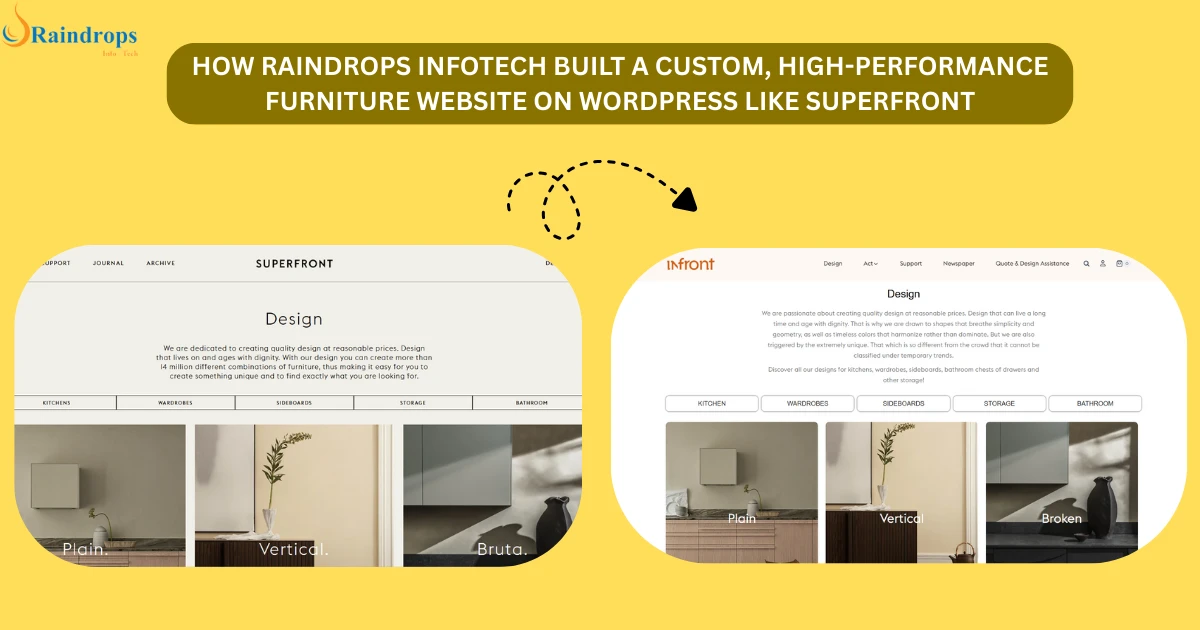

Can WordPress handle high-end furniture website development?

When you think of furniture stores online, names like IKEA might come to mind (famous for their sleek designs and modular furniture). But there’s another level of customization offered by high-end furniture eCommerce websites like Superfront, where you can personalize and configure furniture pieces to meet your exact specifications.

Raindrops Infotech faced the challenge of developing a similar experience using WordPress for furniture website development, focusing on delivering custom features for a high-end eCommerce site. This involved incorporating dynamic product configurators, real-time design previews, and a seamless customer journey. The question was: Can WordPress handle this level of customization and performance needed for such a furniture eCommerce website?

The answer is Yes! And that’s how Infronts was created.

Here’s how Raindrops Infotech tackled the challenge and created a fully functional, premium furniture website with advanced furniture configurators and custom WooCommerce furniture store design- Infronts!

How Raindrops Infotech created replica of a furniture e commerce website Superfront.

The Challenge: Building a Custom WordPress Furniture Store with Advanced Features

The client wanted an online furniture store that could rival platforms like Superfront, where customers can fully personalize their furniture in real-time. Key requirements included:

  • point-icon

    Product Customization: A robust furniture product customization online tool to let customers visualize their selections in real-time, selecting materials, sizes, and accessories.

  • point-icon

    High-End User Experience: A premium furniture website that loads quickly, features rich images, and ensures easy navigation across devices.

  • point-icon

    Backend Control: The ability for the client to manage product variants, images, and pricing independently, without needing constant developer intervention.

  • >

Raindrops Infotech needed to determine if WordPress, known for being a more straightforward eCommerce platform, could scale to meet these complex needs.

The Solution: Building a Customized, High-Performance Furniture ECommerce Website

To create a high-end WordPress furniture store, Raindrops Infotech selected a tech stack that balanced customization, scalability, and speed. Here’s what they used:

Step 1: Choosing the Right Tech Stack for Furniture Website Development

discover-more-slide-shape

Raindrops Infotech chose a flexible tech stack to build a custom WordPress furniture store that would provide the following:

  • point-icon

    WordPress + WooCommerce: The core of the website, providing essential furniture eCommerce website development features such as product management, order tracking, and payment integration.

  • point-icon

    Advanced Custom Fields (ACF Pro): A plugin that allowed them to create custom fields for various product options like materials, colors, and sizes.

  • point-icon

    Elementor Pro: For drag-and-drop page building, creating beautiful and responsive design layouts while maintaining site performance.

  • point-icon

    Custom JavaScript Modules: These modules powered the product configurator and live visualizations, making real-time customization seamless for users.

  • point-icon

    Custom PHP Solutions: Instead of relying on third-party plugins, Raindrops wrote custom PHP code for product filters and dynamic previews, optimizing performance.

This tech stack empowered Raindrops to create a premium furniture website that combined flexibility with high performance, allowing the site to grow without sacrificing speed or user experience.

Step 2: Building the Furniture Configurator WordPress for Real-Time Customization

discover-more-slide-shape

One of the standout features of this project was the furniture configurator WordPress tool, which enabled customers to see live changes to their selections. Here’s how it worked:

  • point-icon

    Product Preview: Customers could instantly see how their selected furniture pieces (like color, material, and size) would look in real-time.

  • point-icon

    Dynamic Filters: Users could filter product options by various attributes, such as material or size, and see the results immediately.

  • point-icon

    Mobile Responsiveness: The configurator was fully optimized for mobile, offering a smooth and interactive experience across all devices.

This product customization tool brought the furniture store to life, offering a highly engaging experience that helped drive conversions and customer satisfaction.

Step 3: Performance Optimization for High-End Furniture Website Design

discover-more-slide-shape

For high-end eCommerce websites like this one, performance is crucial. Raindrops Infotech optimized the site in several key areas:

  • point-icon

    Image Optimization: Using tools to compress images and apply lazy loading, preventing large media files from slowing down the site.

  • point-icon

    Custom Development: By building custom dynamic filters and product preview functions, the site remained lightweight and fast without relying on heavy plugins.

  • point-icon

    Caching and CDN: With WP Rocket and a Content Delivery Network (CDN), Raindrops ensured that the website remained fast, even under heavy traffic.

These optimizations kept the furniture website fast and responsive, ensuring a smooth browsing experience and reducing bounce rates.

Step 4: Giving the Client Full Control Over Their Furniture ECommerce Website

discover-more-slide-shape

A significant goal of the project was to give the client full control over their site, allowing them to update product listings, prices, and images without needing ongoing developer support. Raindrops Infotech achieved this with:

  • point-icon

    Custom Product Pages: The client could easily add new variants or update existing ones (e.g., changing materials or colors) from an intuitive backend interface.

  • point-icon

    Content Blocks: Easily update promotional banners, featured collections, and other content directly from the backend.

  • point-icon

    Full Backend Access: The client had complete control over product categories, prices, and content, making it easy for them to keep the site fresh.

With this control, the client could make timely updates to their store without having to wait for external development work, streamlining operations and improving efficiency.

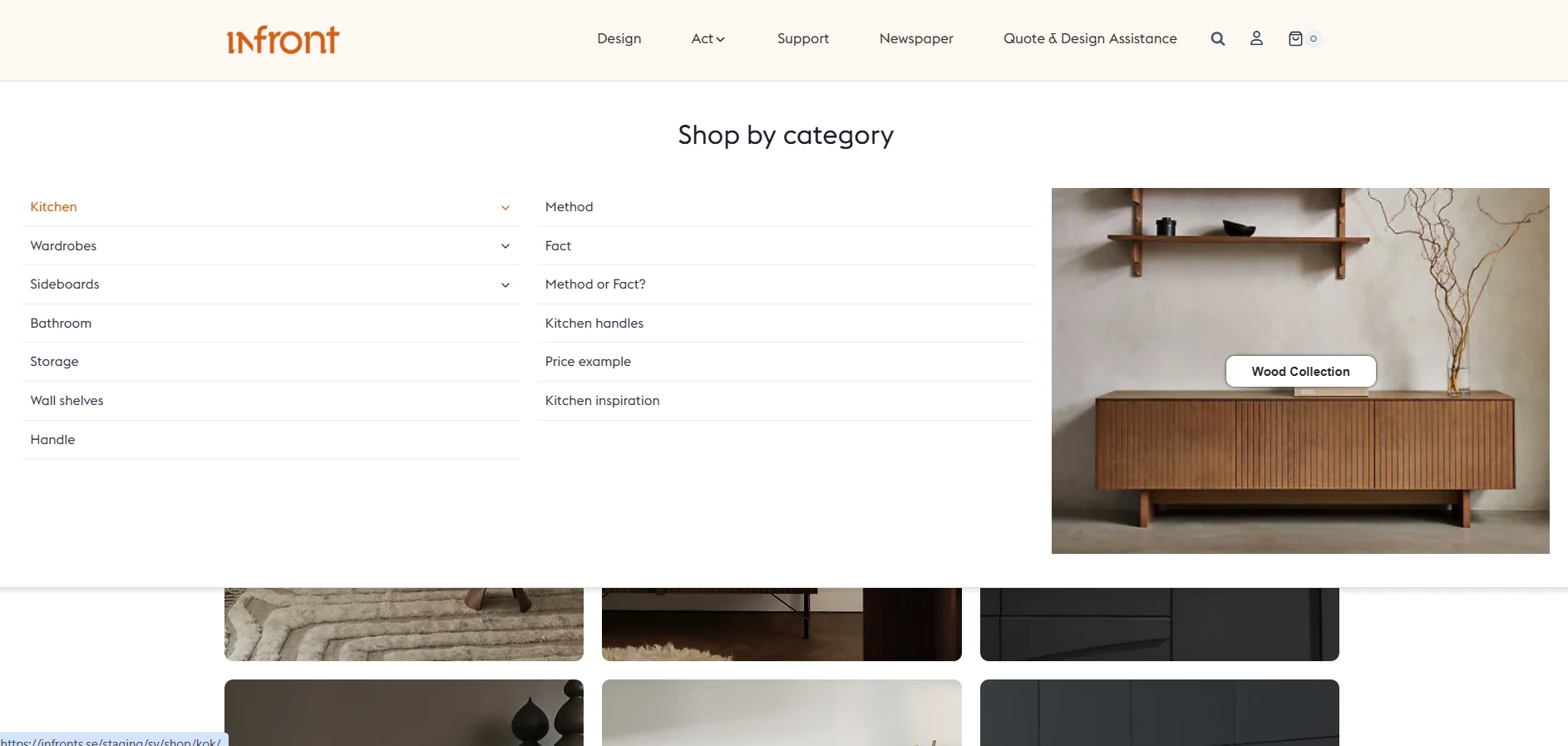
Detailed product page of Infronts- furniture ecommerce website developed by Raindrops Infotech.

The Result: A Fully Custom, High-End Furniture ECommerce Website

Raindrops Infotech successfully delivered a fully custom WordPress furniture store that:

  • point-icon

    Features a premium, interactive product configurator for personalized furniture customization.

  • point-icon

    Loads quickly and performs efficiently, thanks to optimizations like image compression and caching.

  • point-icon

    Is mobile-responsive, ensuring a seamless experience across all devices.

  • point-icon

    Empowers the client with complete control over their product listings and pricing.

This furniture eCommerce website now offers a visually rich, smooth, and engaging user experience, helping the client stand out in a competitive marketplace.

Why Choose Raindrops Infotech for Furniture Website Development?

Raindrops Infotech specializes in building custom furniture websites that go beyond simple online stores. Here’s why businesses choose them for WordPress eCommerce store development:

  • point-icon

    Tailored Solutions: No generic templates. Each project is custom-designed to meet specific business needs.

  • point-icon

    Performance Focused: Raindrops ensures that every site performs flawlessly, even under heavy traffic, by optimizing speed and functionality.

  • point-icon

    Seamless User Experience: From interactive product configurators to smooth mobile interfaces, every detail is crafted to maximize user engagement.

  • point-icon

    Client Autonomy: The websites are built with user-friendly backends, empowering clients to make updates without external support.

Ready to Build Your Custom Furniture ECommerce Website?

If you’re looking to create a premium, customizable furniture website that offers an interactive user experience, Raindrops Infotech is your go-to partner.

  • point-icon

    Custom Design: Tailored to your brand and business goals.

  • point-icon

    Fast Delivery: Quality development without delays.

  • point-icon

    Full Control: Empowering you to manage your site independently.

Contact Raindrops Infotech today to discuss your project and get started on building your next furniture website!

TOP 5 COMMON WEBSITE LAUNCH MISTAKES TO AVOID

You’re finally launching your website…but are you missing something?

So you’ve got the idea. Maybe even a logo. A design in your head. You’re all set to go live. But wait. Before you hit that “publish” button, pause for a second.

Because the truth is, launching a website isn’t just about making it look pretty or getting it out there fast. It’s about building something that actually works, brings in traffic, and converts visitors into customers. And guess what? Most people mess that up. They launch too soon. Skip the basics. Overthink the wrong things. And before they know it, the website they poured energy into… just sits there. Quiet. No traffic. No sales. No results.

This blog is your shortcut to avoiding that. I’ll walk you through the top 5 common website launch mistakes people make (even smart ones), and exactly how you can avoid them.

People developing a website while avoiding the common website launch mistakes.

Mistake 1: Not defining a clear purpose for your website

This is the root of most website failures and the one of the common website launch mistakes a developer makes. And, trust me, you have to avoid this.

If you’re launching a site with the vague idea of “just having an online presence,” pause. Ask yourself: Why does your website exist?

  • point-icon

    Do you want to collect leads?

  • point-icon

    Are you trying to sell a product or service?

  • point-icon

    Do you want people to read your content or build trust in your expertise?

If your website has no clear purpose, it becomes digital clutter. Visitors won’t know what to do. You won’t know what to track. And the whole thing becomes a confusing experience.

How to Fix It?

discover-more-slide-shape
  1. point-icon

    Write down your website’s primary goal in one sentence. Example: “My site’s job is to get leads for my freelance design business.”

  2. point-icon

    Make that goal obvious on the homepage. Ask a friend to open the site for 5 seconds and tell you what it’s about. If they can’t guess the goal, fix it.

  3. point-icon

    Design every section with that goal in mind.

    • point-icon

      If it leads: prominent form or booking button.

    • point-icon

      If it’s sales: clean product display + Buy Now.

    • point-icon

      If it’s brand awareness: great visuals + credibility + contact.

Don’t launch until your site has one clear job, and it does that job well.

Mistake 2: Ignoring Mobile Optimization

More than 50% of web traffic today comes from smartphones. If your site looks broken, loads slowly, or acts weird on a phone, people bounce. And once they leave, they’re not coming back.

Mobile-friendliness isn’t optional. It’s basic survival. And, specially in this era this website launch mistake is super common and you JUST cannot afford to ignore it.

How to Fix It?

discover-more-slide-shape
  1. point-icon

    Use Responsive Design: This means your layout adapts to all screen sizes automatically. Most modern CMS tools (like WordPress, Webflow, or Shopify) support this — but you have to test.

  2. point-icon

    Test on real devices, not just your desktop browser: Open your site on different phones: iPhone, Android, tablet. See what breaks.

  3. point-icon

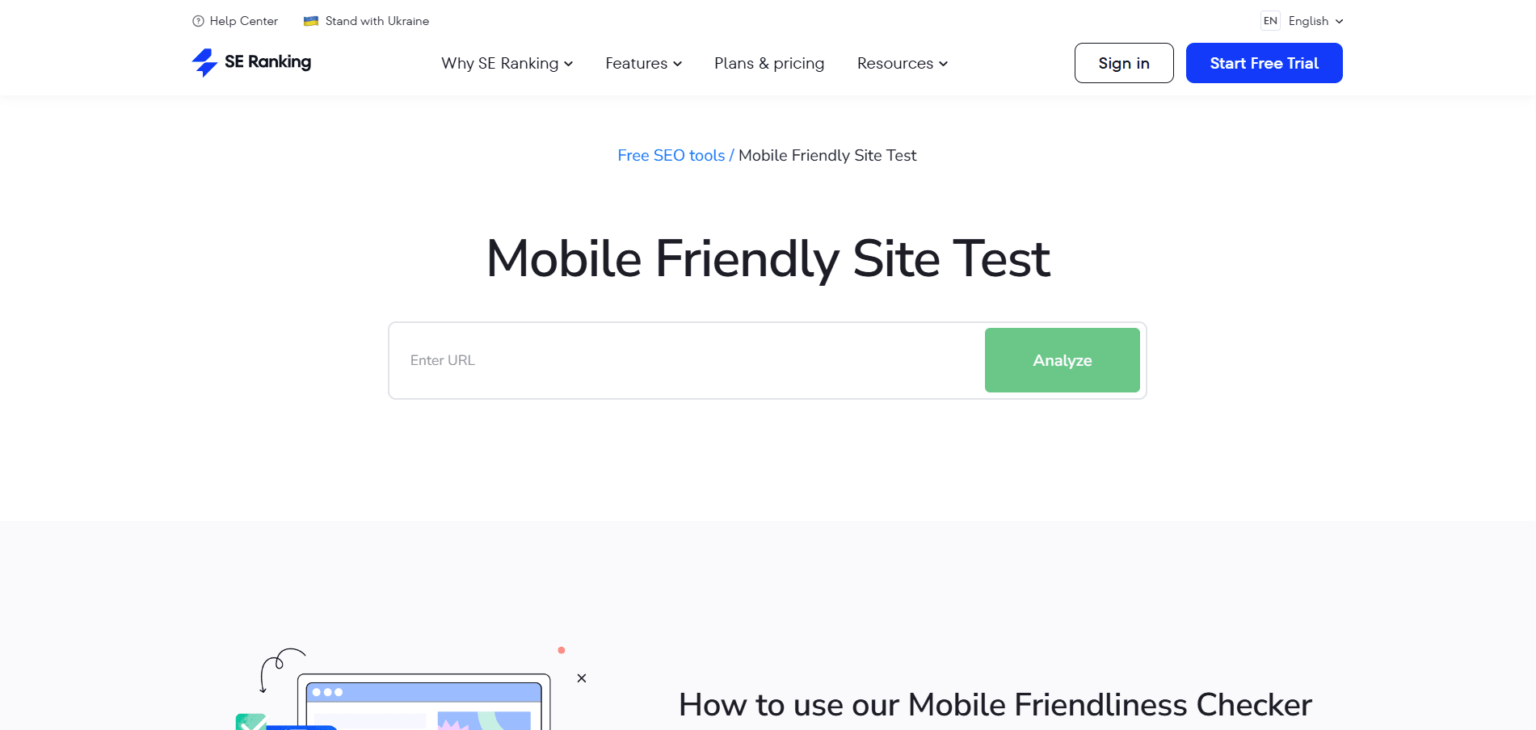
    Run it through Mobile-Friendly Test: Open your site on different phones: iPhone, Android, tablet. See what breaks.

  4. point-icon

    Avoid these mobile-killers:

    • point-icon

      Pop Ups that cover the screen

    • point-icon

      Tiny buttons or unreadable text

    • point-icon

      Slow loading pages due to heavy images

Mobile-Friendly Test

Mistake 3: Skipping SEO (Search Engine Optimization)

Okay yes know that you’ve built a solid website. Looks good, loads fast. But nobody’s visiting it. Why? Because you’ve made one of the biggest yet common website launch mistakes.

That’s what happens when you skip SEO (Search Engine Optimization), your site is live, but Google has no clue what it’s about. And if Google doesn’t get it, your potential customers won’t either. This is not about ranking 1 for some impossible keywords. It’s about making sure your site is findable when people are already looking for something you offer.

How to fix it?

1: Know what people are searching for

discover-more-slide-shape

Start with keyword research. You’re not guessing here — you’re finding out the exact words people type into Google when they’re trying to find what you sell or do.

Use free tools like:

  • point-icon

    Google Keyword Planner

  • point-icon

    Ubersuggest

  • point-icon

    AnswerThePublic

Look for:

  • point-icon

    Real questions (like “how to launch a new business website”)

  • point-icon

    Phrases your audience would naturally say

  • point-icon

    Keywords with decent traffic but low competition

This helps you target what real people actually want, not just what sounds good.

2: Use your keywords smartly

discover-more-slide-shape

Now that you have your keywords, don’t just stuff them everywhere. Use them where it actually matters:

  • point-icon

    In your page titles

  • point-icon

    In your headings (H1, H2, etc.)

  • point-icon

    Naturally in your content

  • point-icon

    In your URLs

  • point-icon

    Inside your image alt text

3: Don’t forget the technical stuff

discover-more-slide-shape
  • point-icon

    Use clean, short URLs: example.com/seo-tips not example.com/page?id=123

  • point-icon

    Write compelling meta titles (under 60 characters)

  • point-icon

    Write meta descriptions (under 160 characters) that make people click

  • point-icon

    Use heading tags properly (H1 for main title, H2 for sections)

  • point-icon

    Create a sitemap and submit it through Google Search Console (It tells you how Google sees your site and what keywords people are using to find you (or not find you yet).

  • point-icon

    Make sure your site is HTTPS secure, mobile-friendly, and fast

Mistake 4: No Clear Call to Action (CTA)

If your website doesn’t clearly tell them what to do next, chances are, they’ll do nothing. Not because they’re not interested, but because there’s no direction.

No CTA = no conversion. Simple.

It doesn’t matter how good your design or content is if your visitor is left wondering, “What now?”, you’ve already lost them. Most websites make this mistake by either hiding the CTA, placing five different ones on the same page, or making it so dull that nobody wants to click it.

How to fix it?

1. Decide on One Clear Action

discover-more-slide-shape

Before anything else, get brutally clear about what you want your visitor to do. Do you want them to:

  • point-icon

    Call you?

  • point-icon

    Fill out a contact form?

  • point-icon

    Buy a product?

  • point-icon

    Book a service?

  • point-icon

    Download a brochure or PDF?

Pick one. Because if you’re asking them to do all five, they’ll do none. Your page should have a single focus — and that starts with a single CTA.

2. Place the CTA Where It Actually Gets Seen

discover-more-slide-shape

Too many websites hide their main CTA in the footer or tuck it away in a corner. Bad move.

You need to place your CTA in spots where users naturally pause or take decisions:

  • point-icon

    At the very top (header or hero section)

  • point-icon

    After major sections of content

  • point-icon

    Right before a user would bounce (bottom of the page)

Pick one. Because if you’re asking them to do all five, they’ll do none. Your page should have a single focus — and that starts with a single CTA.

3. Make It Visually Stand Out

discover-more-slide-shape

If your CTA button looks like every other part of the site: same font, same color, same size, it’s going to get ignored.

Instead, use:

  • point-icon

    A contrast color for buttons (one that pops from the background).

  • point-icon

    Short, punchy, action-oriented text like “Book My Free Demo,” “Get Quote,” or “Download Now”.

  • point-icon

    Enough spacing around the CTA so it doesn’t feel crammed or hidden.

Also, ditch the word “Submit.” It’s vague, robotic, and doesn’t tell anyone what they’re actually doing.

4. One Page, One CTA

discover-more-slide-shape

This is where most websites go wrong. They stack buttons like “Buy Now,” “Subscribe,” “Read Blog,” “Join Webinar” — all on the same page. And guess what happens? The visitor does none of it.

Every page on your site should have one goal, one message, one action. You’ll get better results by guiding them clearly than by overwhelming them with choices.

Mistake 5: Launching Without Testing

You wouldn’t launch an app without testing, right?

So why publish your website without running it through a solid check?

Here’s the thing: many business owners spend weeks building their site, picking colors, writing copy, designing layouts but forget the final (and most important) step before going live.

Testing.

discover-more-slide-shape

And not just glancing over it. We’re talking real, focused pre-launch testing, the kind that saves your reputation before a customer finds what you missed.

Because what seems “fine” to you might be full of silent problems like broken links, buttons that don’t work, or forms that never reach your inbox.

What Can Go Wrong?

You might think everything looks good on your screen… but here’s what often gets ignored:

  • point-icon

    Links that go nowhere — or worse, to the wrong place

  • point-icon

    Buttons that don’t trigger anything

  • point-icon

    Forgotten “Lorem Ipsum” or obvious typos

  • point-icon

    Contact forms that look great… but don’t actually send emails

  • point-icon

    Pages that take forever to load

  • point-icon

    Images that break on mobile

  • point-icon

    Pages that never show up on Google because they weren’t indexed

  • point-icon

    Missing SSL certificates that scare visitors with “Not Secure” warnings

Even one of these issues can seriously hurt your brand’s first impression.

How to fix it?

discover-more-slide-shape

Before you launch, run a Pre-Launch QA Checklist — not just to tick boxes, but to genuinely experience your site like a first-time visitor would.

Here’s what to check:

  • point-icon

    Test Every Link and Button: Click on everything, literally. Internal links, external links, menu items, buttons, footer navigation. They should all take the user exactly where they’re supposed to go.

  • point-icon

    Check All Forms: Submit every form on your site. Make sure the data actually arrives in your inbox, and test for mobile usability. A non-working form = lost leads.

  • point-icon

    Load Speed Matters: Use tools like Google PageSpeed Insights or GTmetrix. If your site takes longer than 3 seconds to load, that’s a problem — especially on mobile. Compress images, eliminate unnecessary scripts, and optimize your server.

  • point-icon

    Mobile and Cross-Browser Testing: Just because your site looks perfect on Chrome doesn’t mean it’ll behave the same on Safari, Firefox, or mobile browsers. Test it across multiple devices and screen sizes.

  • point-icon

    Look for Placeholder Content: Leftover “Lorem Ipsum,” broken images, or unfinished sections instantly damage trust. Triple-check every page for anything that feels incomplete.

  • point-icon

    Fix 404 Errors: Set up proper redirects for old or broken links. A single “Page Not Found” error can kill trust fast. Use a custom 404 page if needed — but better yet, avoid them entirely.

  • point-icon

    Secure It with SSL: Make sure your site has an active SSL certificate (HTTPS). A “Not Secure” warning in the browser is the fastest way to scare visitors off — especially if you collect any data.

  • point-icon

    Get Real Feedback: Before launch, ask 3–5 people (who weren’t involved in the build) to navigate your site. Watch where they get stuck, confused, or click the wrong thing. If they’re lost, your users will be too.

Build It Right, The First Time

Launching a website isn’t just about going live. It’s about getting it right before anyone sees it. Every mistake we’ve discussed isn’t just a technical issue. It’s something that affects how people see your brand, how they interact with your business, and ultimately, whether or not they trust you.

But the good news? Every one of these mistakes is 100% avoidable, especially if you have the right partner guiding you through the process. At Raindrops Infotech, we don’t just build websites. We build launch-ready, future-proof online experiences that tick every box.

Whether you’re planning your first website or relaunching an old one, we’re here to make sure nothing gets missed.

Thinking of launching your website the right way? Schedule a free consultation with us!

If you’re planning to build anything on the web in 2025: an app, a platform, or a side project, you can’t ignore the backend.

It’s what keeps your app running smoothly behind the scenes. But with so many backend frameworks out there, it’s easy to get overwhelmed.

Which one should you use? Which one is fast, reliable, and actually makes development easier? And most importantly, which one is worth learning or investing time in this year?

That’s exactly what this blog will answer.No overhype. Just the 5 most popular backend frameworks to use in 2025, broken down in simple terms, with real use cases, pros, and why they’re worth your attention.

Whether you’re a developer, tech lead, student, or startup founder, this is for you.

Engineer developing a website using best backend frameworks in 2025.

What is a Backend Framework?

A backend framework is the toolset that helps you build the engine of your application—how it stores data, talks to the frontend, handles users, processes logic, and scales when needed.

Think of it like this: Frontend is what users see. Backend is what makes it all work.

A framework gives you the structure, features, and shortcuts so you don’t have to build everything from scratch.

Top 5 Popular Backend Frameworks in 2025

1. Node.js with Express.js

Overview:

Node.js is a powerful server-side runtime environment that runs JavaScript outside the browser, and when paired with Express.js — a minimal yet flexible web framework — it becomes a go-to choice for scalable backend development. Together, they form one of the most popular backend frameworks in 2025, especially for real-time and API-driven applications.

With JavaScript running on both the client and server sides, Node.js + Express creates a seamless full-stack experience — a major win for startups and tech giants alike.

Why It’s a Top Pick in 2025?
  • point-icon

    Unified Language: JavaScript from frontend to backend = faster dev, easier hiring, and consistent logic across the stack.

  • point-icon

    Non-blocking Architecture: Its event-driven model handles thousands of concurrent connections efficiently, perfect for chat apps, gaming, and live feeds.

  • point-icon

    Massive Ecosystem: With npm (Node Package Manager), developers can tap into hundreds of thousands of open-source packages to speed up development.

Best Use Cases:
  • point-icon

    Real-time apps (chat, multiplayer games, streaming)

  • point-icon

    Single Page Applications (SPAs)

  • point-icon

    RESTful APIs and microservices

  • point-icon

    Scalable mobile backends

Pros:
  • point-icon

    Speed and Performance: Lightweight and fast under high I/O demands.

  • point-icon

    Rapid Development Cycle: Tons of reusable npm packages speed up delivery.

  • point-icon

    Huge Community: One of the largest ecosystems, with constant updates and community support.

Cons:
  • point-icon

    Not Ideal for CPU-Heavy Work: Single-threaded model struggles with compute-heavy tasks.

  • point-icon

    Callback Hell: Without proper async management (or using Promises/async-await), code can get messy.

Netflix and LinkedIn both use Node.js at scale to deliver real-time, performant backend services for millions of users worldwide.

discover-more-slide-shape

2. Django (Python)

Overview:

Django is a high-level Python backend framework built for developers who want to build secure, maintainable, and scalable web applications quickly. It follows the “batteries-included” philosophy — offering tools for everything from user authentication to admin dashboards out of the box.

In 2025, Django remains one of the best backend frameworks for web development — especially when rapid development and clean code are priorities.

important metric to consider for website redesign for conversion rate optimization
Why It’s Still Relevant in 2025?
  • point-icon

    Out-of-the-Box Security: Comes with built-in protection against SQL injection, XSS, CSRF, and more.

  • point-icon

    Built for Scale: Supports everything from small websites to high-traffic enterprise apps.

  • point-icon

    Versatile: From blogs and CRMs to fintech platforms and data portals — Django can handle it all.

Best Use Cases:
  • point-icon

    Content management systems

  • point-icon

    E-commerce and booking platforms

  • point-icon

    Fintech and analytics tools

  • point-icon

    Data-driven platforms

Pros:
  • point-icon

    Rapid Development: Pre-built modules = less time building from scratch.

  • point-icon

    Built-In Admin Interface: Automatically generates an admin panel for managing data.

  • point-icon

    Great Documentation: One of the best-documented frameworks with strong community support.

Cons:
  • point-icon

    Not Ideal for Microservices: Its monolithic structure isn’t a natural fit for microservices unless restructured.

  • point-icon

    Learning Curve for Beginners: Beginners might find it rigid or opinionated at first.

  • point-icon

    Great Documentation: One of the best-documented frameworks with strong community support.

Instagram uses Django to manage its enormous database and serve millions of users globally with performance and security.

discover-more-slide-shape

3. Spring Boot (Java)

Overview:

Spring Boot is an opinionated framework that simplifies the setup and deployment of Java-based applications using the Spring ecosystem. It eliminates the need for heavy configuration while still giving you access to the full power of the Java world. In 2025, Spring Boot remains one of the best backend frameworks for enterprise-grade and microservices-based apps.

It combines speed, stability, and scalability — making it a long-time favorite for backend systems that just need to work reliably.

Homepage of SpringBoot- one of best backend frameworks in 2025
Why It’s Perfect for Today’s Backend Needs?
  • point-icon

    Microservices Friendly: Built to support microservice architecture with minimal boilerplate.

  • point-icon

    Enterprise-Ready: Trusted in industries like healthcare, finance, and telecom for its reliability.

  • point-icon

    Modular and Extensible: Plug-and-play support for things like messaging, security, and data layers.

Best Use Cases:
  • point-icon

    Banking and insurance software

  • point-icon

    Enterprise SaaS platforms

  • point-icon

    Complex business logic systems

  • point-icon

    Microservices environments

Pros:
  • point-icon

    Clean and Maintainable: Follows well-defined design patterns and best practices.

  • point-icon

    Built-In Tools: Comes with built-in support for databases, web security, logging, etc.

  • point-icon

    Strong Java Community: Backed by decades of Java knowledge and a massive dev network.

Cons:
  • point-icon

    Overkill for Simple Apps: Might feel too heavy for smaller projects or MVPs.

  • point-icon

    Memory Usage: Uses more memory compared to lighter frameworks like Node.js or Flask.

Alibaba and Ticketmaster both rely on Spring Boot to manage large-scale backend systems with complex workflows and massive user bases.

discover-more-slide-shape

4. Ruby on Rails (RoR)

Overview:

is a full-stack web application framework that follows the MVC (Model-View-Controller) architecture and prioritizes convention over configuration. Built with developer happiness in mind, Rails has been powering startups and mature apps for over a decade.

Even in 2025, Rails is among the top backend frameworks for those looking to build MVPs quickly or launch SaaS platforms with minimal code.

Why It’s Still Loved in 2025?
  • point-icon

    Rapid Prototyping: You can build and deploy MVPs in days, not weeks.

  • point-icon

    DRY and Clean: The “Don’t Repeat Yourself” philosophy makes Rails apps maintainable and organized.

  • point-icon

    Vibrant Ecosystem:Tons of Gems (plugins) extend functionality without reinventing the wheel.

  • point-icon

    Startups building MVPs

  • point-icon

    Marketplaces and e-commerce apps

  • point-icon

    Internal tools and dashboards

  • point-icon

    Social platforms

Pros:
  • point-icon

    Readable and Elegant Code: Ruby syntax is expressive and beginner-friendly.

  • point-icon

    Integrated Testing Tools: Comes with built-in testing support, encouraging TDD (Test Driven Development).

  • point-icon

    Active Community: Still vibrant, with plenty of updated Gems and contributors.

Cons:
  • point-icon

    Performance Limitations: Not as fast as newer frameworks under very high load.

  • point-icon

    Smaller Talent Pool: Hiring senior Rails devs in some regions may take longer than Node.js or Python devs.

Shopify, one of the largest e-commerce platforms in the world, is built on Ruby on Rails and supports millions of online stores.

discover-more-slide-shape

5. FastAPI (Python)

Overview:

FastAPI is a relatively new Python backend framework that’s already made massive waves in the developer world. Designed for building APIs quickly and with high performance, FastAPI uses Python type hints and async programming to deliver lightning-fast results. It’s built on top of Starlette and Pedantic — giving it both speed and reliability.

It’s not just another Python framework. In 2025, FastAPI is one of the top backend frameworks chosen for AI, ML, and microservices-heavy apps.

Why FastAPI is a Big Deal in 2025?
  • point-icon

    Ridiculously Fast: It rivals Node.js and Go in speed benchmarks, outperforming Django and Flask in API responses.

  • point-icon

    Developer Experience: Type hints enable auto-validation and auto-generated Swagger docs with zero extra setup.

  • point-icon

    Async-Friendly: Built from the ground up for asynchronous operations — crucial for scalable modern APIs.

Best Use Cases:
  • point-icon

    Machine learning model APIs

  • point-icon

    Real-time data processing systems

  • point-icon

    Microservices

  • point-icon

    Startups working with Python-based stacks

Pros:
  • point-icon

    Super Fast Development: Minimal boilerplate means you write less, launch faster.

  • point-icon

    Built-in Docs: Automatically creates Swagger and ReDoc docs that are interactive and dev-friendly.

  • point-icon

    ML/AI Ready: Plays very well with Python ML frameworks like TensorFlow, PyTorch, and scikit-learn.

Cons:
  • point-icon

    Learning Curve for Beginners: Async and typing can be tricky if you’re used to traditional Python.

  • point-icon

    Smaller Community (For Now): Still growing, so fewer plugins/libraries than Django.

Netflix uses FastAPI to power internal microservices related to machine learning models — thanks to its speed, simplicity, and Python compatibility.

discover-more-slide-shape

What Should You Pick?

Here’s the truth: you can’t go wrong with any of these frameworks if you use them right. Each has its own strength. The real magic lies in understanding your project needs, picking what fits best, and getting really good at it. And if you’re building something serious in 2025 and need expert help…

Let’s Build It With Raindrops Infotech

At Raindrops Infotech we specialize in backend development with all the top frameworks — whether it’s Node.js or Django. Whether you’re building an MVP, e-commerce site, or enterprise-grade platform, we’ve got your back. Ready to bring your idea to life with powerful backend technology?

Visit us at raindropsinfotech.com and let’s talk!

Wait, What Does a Website Have to Do with the Environment?

Let’s be honest—when you think about pollution, you picture smoke from factories or plastic in oceans. But your website? Probably not. Here’s the shocker: Every time someone visits a website, it consumes energy. That energy often comes from fossil fuels. Now imagine millions of people visiting thousands of websites every single day. That adds up.

To give you perspective, the internet produces about 3.7% of global greenhouse emissions—that’s more than the airline industry. Even loading a single web page can be equivalent to turning on a light bulb for 5 minutes. And who’s behind this energy drain? Big images, autoplay videos, bloated code, unnecessary scripts—things we don’t even think about. But they all take a toll on servers and networks, which in turn need power.

If you’re a developer, designer, business owner, or someone who simply cares about performance and the planet—you’re part of the solution. Let’s get into it.

Engineer developing a website using best backend frameworks in 2025.

Why Eco-Friendly Web Design is the Future? (and Not Just a Trend)

Building an eco-friendly website isn’t some “just another” trend. It’s smart. Here’s why:

  • point-icon

    Google rewards fast websites. Faster load times = better SEO = higher rankings. Period.

  • point-icon

    Users bounce off slow sites. A clean, optimized website keeps them engaged.

  • point-icon

    It saves you money. Smaller files = less bandwidth = lower hosting costs.

  • point-icon

    It reflects your values. More and more users, especially Gen Z and millennials, care about brands that walk the talk.

This isn’t about putting a green leaf in your logo or writing a “we care about nature” line on your About page. It’s about building websites that use less, do more, and don’t make the planet pay for your design choices.

What Makes a Website “Eco-Friendly”?

Here’s what actually matters. No trending words. Not trends. Just real, technical stuff:

  • point-icon

    Clean Code: Minify your HTML, CSS, JS. Remove unnecessary libraries. Avoid bloat.Faster load times = better SEO = higher rankings. Period.

  • point-icon

    Green Hosting: Use providers that run on renewable energy or offset their carbon footprint (e.g., GreenGeeks, Kualo, A2 Hosting’s green plans).

  • point-icon

    Lightweight Design: No giant images that take ages to load. Keep things simple, sharp, and optimized.

  • point-icon

    Efficient Fonts & Media: Don’t go wild with 5 font families or auto-playing background videos.

  • point-icon

    Fewer Server Requests: Combine files. Use caching. Use fewer plugins and external scripts.

  • point-icon

    Mobile-First: More than half of your traffic is mobile. Mobile-first design not only helps UX, it uses less bandwidth.

Fun fact? Even your choice of fonts can affect energy usage. System fonts (like Arial, Georgia) load faster and consume less power than custom web fonts. Also, dark mode only helps in OLED screens. So, don’t just assume turning everything black makes it sustainable.

How to Build an Eco-Friendly Website? (The Real Way in 2025)

If you actually want to build eco-friendly websites that don’t suck up energy and still perform like a champ, here’s where to start. These five steps aren’t just good for the planet—they’re great for your users and your bottom line.

1. Start With Green Hosting That Makes Sense

First things first—where your website lives matters. Traditional hosting uses massive data centers powered by fossil fuels. That means every click on your site could be adding to carbon emissions without you realizing it.

Green hosting is your low-hanging fruit here. Choose providers that run on renewable energy or offset their carbon footprint. A few solid options in 2025:

Also, pick servers closer to your audience. The shorter the distance your data has to travel, the less energy it burns. Plus, your site loads faster—win-win. This one change alone puts you ahead of most websites out there. It’s simple, effective, and genuinely sustainable.

Homepage of A2Hosting’s website
discover-more-slide-shape

2. Shrink Everything (Without Losing the Vibe)

Heavy websites = more data = more power needed. But the good news? You can slim your site down without making it look boring or basic. Here’s how:

  • point-icon

    Use compression tools like TinyPNG, Squoosh, or ShortPixel to make your images lighter without killing quality.

  • point-icon

    Convert all images to WebP or AVIF —they look sharp and load fast.

  • point-icon

    Go beyond images: compress videos, PDFs, audio files, and anything you embed.

Think of it like packing a suitcase. You want everything you need, but you fold it neatly and leave out what you don’t. That’s how you optimize website performance without compromising on aesthetics.

discover-more-slide-shape

3. Load Only What You Need, When You Need It

Lazy loading is your best friend. It’s a simple trick that saves energy and improves speed. Instead of loading every image, iframe, or video as soon as the page opens (even the stuff users may never scroll to), lazy loading lets your site wait until the user actually gets there.

  • point-icon

    This saves bandwidth.

  • point-icon

    Reduces Time to First Byte (TTFB).

  • point-icon

    Boosts your Core Web Vitals, which Google loves for SEO.

And yes, this includes those sneaky third-party embeds (like YouTube videos or map widgets). Let them load only on click or interaction—not by default. You’ll see a huge difference.

discover-more-slide-shape

4. Cut the Clutter (Your Plugins and Animations Might Be the Problem)

Every extra thing on your site—autoplay videos, popups, fancy transitions—drains energy and slows you down. It’s not about being boring. It’s about being intentional. Here’s what to do:

  • point-icon

    Ditch auto-play content unless it’s absolutely necessary.

  • point-icon

    Keep your UI clean, intuitive, and minimal by design.

  • point-icon

    Audit your plugins every month. If you’re not using it, lose it. Each plugin makes your site heavier, and that affects both speed and sustainability.

Simple rule: If it doesn’t help the user or the planet, it doesn’t belong.

You wouldn’t run a business without tracking numbers. So why run a website without checking how much carbon it’s creating? There are various tools available on google, please check whichever suits you. They’ll tell you how your site is performing in terms of emissions—and what you can improve. Run these tests regularly, especially after a redesign or big content update.

discover-more-slide-shape

Sustainable Web Design Isn’t a Sacrifice. It’s a Smart Move.

Eco-friendly websites are not boring websites. They’re fast. Clean. Purposeful. And trust us, they perform better across the board. You don’t need to trade beauty for performance. Or speed for sustainability. You can have all three. Every small decision—from the font you choose to the hosting provider you pick—adds up. So if you care about long-term SEO, performance, and your planet, now’s the time to act.

Ready to future-proof your website and make it eco-friendly? Let’s build something great together. Talk to Raindrops Infotech — and let’s make your digital presence clean, green, and powerful.

A Fairer Ride-Hailing App? Let’s Find Out.

Think of Uber. Every time a driver completes a ride, a big chunk of their earnings goes straight to the platform. Fair? Not really. Now, imagine a ride-hailing app where drivers keep more of their hard-earned money. They choose between:

  • point-icon

    A fixed-time membership (24, 48, or 72 hours) where they pay once and keep 100% of their fares.

  • point-icon

    A pay-per-ride model where they pay a small fee for the first few rides, but after reaching a limit, all earnings are theirs.

This isn’t just a concept—it’s exactly what Raindrops Infotech helped build. A new kind of ride-hailing app that challenges the traditional commission-based model and puts drivers in control of their earnings. This app is called Saaruche.

But here’s the real question:

Homepage of Saaruche’s website- designed and developed by Raindrops Infotech.

How did Raindrops Infotech develop such a complex app in just two months?

What tech stack did they use? What challenges did they face? And more importantly—why should businesses looking to build their own ride-hailing app trust Raindrops Infotech? Let’s break it down.

The Challenge: Building a Unique Ride-Hailing Platform From Scratch

The client had a clear vision:

  • point-icon

    Put drivers first. Give them better earning opportunities.

  • point-icon

    Offer flexible pricing models. Unlike Uber, where commissions eat up earnings, this app lets drivers choose how they pay.

  • point-icon

    Ensure a smooth and fast user experience. No one likes slow apps, especially for booking rides.

But here’s where it got tricky.

Most ride-hailing apps follow a simple commission-based model. Building a system with two different pricing models required a completely different approach. On top of that, the app needed:

  • point-icon

    Accurate GPS tracking for live ride updates.

  • point-icon

    A robust payment gateway for seamless transactions.

  • point-icon

    A smooth booking experience for both drivers and passengers.

And the biggest challenge? Speed. The client wanted the app built fast—without compromising quality.

The Solution: How Raindrops Infotech Made It Happen?

Raindrops Infotech is known for its smart development strategies—building apps efficiently without cutting corners. Here’s how they pulled this off in record time.

Step 1: Picking the Right Tech Stack

To ensure the app was fast, secure, and scalable, Raindrops Infotech chose:

  • point-icon

    Flutter for the front-end → A cross-platform framework that allows the app to run smoothly on both Android & iOS with a single codebase.

  • point-icon

    Laravel for the backend → A powerful PHP framework known for speed, security, and scalability—perfect for handling thousands of ride requests.

  • point-icon

    Google Maps API for real-time tracking → Ensuring precise pickup & drop-off locations and accurate distance calculations.

  • point-icon

    Stripe & Razorpay for payments → Safe, fast, and seamless transactions for both drivers and passengers.

  • point-icon

    Firebase for real-time notifications → Instant updates on ride status, payments, and new ride requests.

This tech stack wasn’t chosen randomly. Each tool was picked to ensure high performance, security, and a flawless user experience.

discover-more-slide-shape

Step 2: Rapid Development Without Starting From Scratch

Most companies would take 6+ months to build a ride-hailing app. Raindrops did it in 2 months. How? Instead of building everything from zero, they used a smart development approach:

  • point-icon

    They started with an existing prototype. Since Raindrops Infotech had worked on a similar project before, they already had a base structure in place.

  • point-icon

    They focused on customizations. Instead of reinventing the wheel, the team modified and optimized the prototype to fit the client’s unique requirements.

  • point-icon

    They used agile development. Weekly sprints, regular testing, and immediate feedback loops helped the team move faster and fix issues on the go.

This approach saved time without sacrificing quality.

discover-more-slide-shape

Step 3: Testing & Fine-Tuning for a Perfect Ride Experience

No app is perfect on the first try. Before launch, the Raindrops team rigorously tested every part of the system:

  • point-icon

    GPS tracking accuracy → Ensuring precise ride locations.

  • point-icon

    Booking flow optimization → Making the ride request process seamless.

  • point-icon

    Load testing → Ensuring the app could handle thousands of users without lag.

  • point-icon

    Payment gateway security → No risks, no delays—just smooth transactions.

  • point-icon

    User experience refinements → Making sure both drivers and passengers could navigate the app effortlessly.

After multiple test runs, adjustments, and refinements, the app was ready to go live.

Guide to using Saaruche- the app.
discover-more-slide-shape

The Result: A Fully Functional Ride-Hailing App in Just 2 Months

Most ride-hailing apps take at least 6–12 months to develop. Raindrops Infotech built this one in just 2 months—without compromising on quality.

  • point-icon

    The app works flawlessly.

  • point-icon

    Drivers love the fair pricing model.

  • point-icon

    Passengers enjoy a smooth booking experience.

  • point-icon

    The client is happy and now attracting investors!

Yes, you read that right. Investors are already showing interest in scaling this app. That’s the power of a well-built product.

Why Do Businesses Trust Raindrops Infotech for Custom App Development?

Building a complex app in record time is not something every development company can pull off. But Raindrops Infotech made it happen.

What Makes Them Different?

  • point-icon

    They don’t waste time on unnecessary steps. Every project follows a smart, efficient development process.

  • point-icon

    They build apps tailored to your unique business model. No cookie-cutter solutions—everything is custom-built.

  • point-icon

    They focus on quality & performance. No shortcuts, no glitches—just fast, high-performing apps.

  • point-icon

    The client is happy and now attracting investors!

This case study proves one thing:

When you have a strong business idea, Raindrops Infotech knows how to bring it to life—fast.

Want to Build a Ride-Hailing App? Here’s What You Should Do Next.

If you’re thinking about building your own ride-hailing app, don’t settle for slow, inefficient developers. Work with experts who deliver results—fast.

Get in touch with Raindrops Infotech today.

  • point-icon

    Custom app development tailored to your business model.

  • point-icon

    Fast turnaround without sacrificing quality.

  • point-icon

    A dedicated team that works with you every step of the way.

Schedule a free consultation with Raindrops Infotech now and bring your app idea to life!


So, you’ve built a website. Great! But here’s the catch—owning a website isn’t a one-time thing. Your website needs constant ongoing maintenance to keep running smoothly. If you neglect it, be ready for slow loading speeds, security risks, broken links, and even loss of rankings on Google!

Now, you’re probably wondering, How much does website maintenance cost in 2025? The answer isn’t the same for everyone. It depends on factors like website type, size, features, and whether you manage it yourself or hire professionals.

In this detailed guide, we’ll cover:

  • point-icon

    The key costs involved in maintaining a website

  • point-icon

    How much businesses spend on maintenance in 2025

  • point-icon

    Ways to optimize costs without compromising quality

  • point-icon

    FAQs to clear all your doubts

By the end of this guide, you’ll have a clear idea of how much to budget for website maintenance and how to ensure your site stays in top shape.

website maintenance cost in 2025

Type of Website

Different websites have different requirements. Here’s a rough estimate based on website type:

  • point-icon

    Personal Blog or Portfolio – ₹1,000 – ₹5,000/month (Minimal maintenance, occasional updates)

  • point-icon

    Small Business Website – ₹3,000 – ₹15,000/month (Regular updates, hosting, security, SEO)

  • point-icon

    E-commerce Website – ₹10,000 – ₹50,000/month (Frequent updates, payment security, product management, marketing tools)

  • point-icon

    Enterprise Website – ₹50,000 – ₹2,00,000/month (High-traffic servers, advanced security, technical support)

DIY vs. Hiring Professionals

You can either manage website maintenance yourself or hire experts. Here’s a comparison:

Factor DIY Maintenance Professional Maintenance
Cost Low (₹500 – ₹5,000/month) High (₹5,000 – ₹50,000/month)
Time Required High (Learning curve involved) Low (Professionals handle everything)
Security Risky if not done correctly Strong security setup
Website Performance Can be inconsistent Regular monitoring & optimization

If you’re running a business, hiring professionals is often worth it since it saves time and ensures high-quality maintenance.

Breakdown of Website Maintenance Costs in 2025

Domain & Hosting Renewal Costs

Domain Renewal Cost:

Your domain is your website’s address. If you don’t renew it, your site disappears!

  • point-icon

    Standard Domains (.com, .in, .net, etc.): ₹800 – ₹1,500/year

  • point-icon

    Premium Domains (Short, keyword-rich, or brandable names): ₹5,000 – ₹50,000+/year

Many providers offer discounts for multi-year renewals. If you’re committed to your site, renewing for 3–5 years can save you money!

Hidden Cost Alert: If you forget to renew, someone else can buy your domain (domain squatting), and you might have to pay thousands to get it back.

Web Hosting Renewal Cost:

Hosting determines your website speed, uptime, and security. Different hosting options come with different price tags:

  • point-icon

    Shared Hosting: ₹3,000 – ₹10,000/year (Best for small, low-traffic sites)

  • point-icon

    VPS Hosting: ₹8,000 – ₹50,000/year (More control, good for growing businesses)

  • point-icon

    Cloud Hosting: ₹12,000 – ₹1,00,000/year (Scalable, ideal for traffic spikes & eCommerce)

  • point-icon

    Dedicated Hosting: ₹1,00,000 – ₹5,00,000/year (For high-traffic enterprise websites)

Warning: If your site loads slowly or crashes often, it’s probably time to upgrade your hosting before you start losing visitors!

Security & Backup Costs

SSL Certificate:

An SSL certificate encrypts your site’s data. Without it, Google marks your site as “Not Secure.”

  • point-icon

    Basic SSL: Free – ₹2,000/year (Many hosting providers offer free SSL)

  • point-icon

    Premium SSL: ₹5,000 – ₹30,000/year (For eCommerce & high-security sites)

Extra Cost: Some SSLs require yearly renewals, so check before purchasing.

Website Backup Services:

Imagine waking up to a hacked website or accidental deletion—without a backup, you’re doomed.

  • point-icon

    Manual Backups: Free (if you do it yourself regularly)

  • point-icon

    Automated Backups: ₹3,000 – ₹12,000/year (Jetpack, CodeGuard, etc.)

Don’t just rely on hosting backups! Keep an external backup in case your hosting provider fails.

Security & Firewall Protection:

Hacking attempts happen every 39 seconds! Protect your site before it’s too late.

Cost of Ignoring Security: A hacked website can lead to data loss, SEO penalties, and blacklisting by Google. Fixing a hacked site can cost ₹20,000 – ₹2,00,000 depending on the damage.

Website Updates & Technical Support Costs

A website isn’t a “set-it-and-forget-it” project. Regular updates keep it running smoothly and secure.

CMS, Plugin, and Theme Updates

  • point-icon

    DIY Updates: Free (but time-consuming & risky if you’re inexperienced)

  • point-icon

    Professional Updates: ₹5,000 – ₹25,000/month (Hiring agencies or freelancers)

Hidden Cost Alert: If you don’t update regularly, plugins can break, causing functionality issues—fixing them later is costlier!

Technical Support & Bug Fixes:

  • point-icon

    Freelancers: ₹1,000 – ₹5,000 per issue

  • point-icon

    Maintenance Agencies: ₹15,000 – ₹50,000/month (Ongoing support, uptime monitoring, bug fixes, etc.)

Content & SEO Maintenance Costs

Google loves fresh content—old sites drop in rankings.

Content Updates

  • point-icon

    DIY: Free (If you have time & skills)

  • point-icon

    Freelance Writers: ₹10,000 – ₹50,000/month (Regular blogs, videos, infographics, etc.)

Regularly updating blogs and landing pages boosts SEO and keeps visitors engaged.

SEO Optimization

If your site isn’t optimized, it won’t rank on Google.

  • point-icon

    Basic SEO Tools: Free – ₹3,000/month (Google Search Console, Ubersuggest, etc.)

  • point-icon

    Advanced SEO Tools: ₹5,000 – ₹15,000/month (SEMrush, Ahrefs, Moz, etc.)

  • point-icon

    SEO Services: ₹20,000 – ₹1,00,000/month (For expert-level optimization)

Ignoring SEO? You’re leaving money on the table. Competitors will outrank you and take your traffic.

Additional Maintenance Costs

Performance Optimization:

Speed matters! A 1-second delay can reduce conversions by 7%.

  • point-icon

    CDN (Content Delivery Network): ₹5,000 – ₹20,000/year (Cloudflare, Akamai, etc.)

  • point-icon

    Speed Optimization Services: ₹10,000 – ₹50,000 (One-time or recurring)

Pro Tip: Check your Google PageSpeed score—if it’s below 80, you’re losing traffic.

discover-more-slide-shape

UX/UI Improvements:

Bad design = high bounce rates. Improve user experience for higher engagement.

  • point-icon

    Basic Tweaks: ₹5,000 – ₹20,000 (Navigation, buttons, layouts, etc.)

  • point-icon

    Full Redesign: ₹50,000 – ₹5,00,000 (Complete revamp for a modern look & better conversions)

ROI on Good Design: Websites with great UX can increase conversions by 200% or more!

discover-more-slide-shape

How to Reduce Website Maintenance Costs(Without Compromising Quality)?

Want to cut down website maintenance expenses without sacrificing performance? Here are some smart strategies to save money while keeping your website running smoothly:

  • point-icon

    Choose the Right Hosting Plan – Avoid paying for high-end hosting if your website has low to moderate traffic. Opt for shared or VPS hosting and upgrade only when necessary. Look for long-term discounts from hosting providers.

  • point-icon

    Use Free Security Plugins – Many security tools like Wordfence and Sucuri offer free versions that provide essential protection without extra costs.

  • point-icon

    Automate Backups – Instead of paying a developer, use automated backup services like Jetpack or CodeGuard to schedule regular backups.

  • point-icon

    Do Basic Updates Yourself – Learning how to update plugins, themes, and content can save you money on maintenance fees.

  • point-icon

    Use Open-Source Tools – Many free themes, plugins, and CMS platforms offer great functionality without the need for paid alternatives.

  • point-icon

    Bundle Services – Some agencies offer discounts when you combine hosting, security, and maintenance into one package.

  • point-icon

    Optimize for Efficiency – Regularly clean up unnecessary plugins and files to improve performance and reduce hosting costs.

By making smart choices, you can maintain a high-quality website without overspending.

discover-more-slide-shape

Final Thoughts: Is Website Maintenance Worth the Cost?

Absolutely! A well-maintained website ensures:

  • point-icon

    Faster load times

  • point-icon

    Better security

  • point-icon

    Higher search rankings

  • point-icon

    Improved user experience

If you’re looking for affordable, professional website maintenance services, Raindrops Infotech offers tailored plans to keep your site in perfect shape. Get in touch today!

discover-more-slide-shape

FAQs on Website Maintenance in 2025

Q1: Can I maintain my website myself?

Yes, if you’re tech-savvy, you can handle basic updates, content changes, and security checks. However, for advanced maintenance, hiring a professional is advisable.

Q2: What happens if I don’t maintain my website?

Your website can become slow, vulnerable to hackers, and lose rankings on Google, ultimately affecting your business.

Q3: How often should I update my website?

Ideally, security updates should be done monthly, content updates weekly, and performance optimizations quarterly.

Q4: What is the cheapest way to maintain a website?

Using free hosting, free security tools, and handling content updates yourself can reduce costs, but this is only feasible for small websites.

Q5: How much do businesses typically spend on website maintenance in India?

Using free hosting, free security tools, and handling content updates yourself can reduce costs, but this is only feasible for small websites.

  • point-icon

    Small businesses: ₹5,000 – ₹15,000/month

  • point-icon

    E-commerce sites: ₹15,000 – ₹50,000/month

  • point-icon

    Large enterprises: ₹50,000 – ₹2,00,000/month


If you’re running a business, whether it’s a startup, a small company, or even a growing enterprise—chances are you’re spending way too much on software.

Think about it:

  • point-icon

    ₹10,000/month on a CRM

  • point-icon

    ₹5,000/month on project management tools

  • point-icon

    ₹8,000/month on marketing automation

  • point-icon

    ₹15,000/month on data analytics

Before you know it, you’re burning lakhs every year!

But what if I told you that you don’t need to spend this huge amount on software? What if you could get the same (or even better) features—for FREE? That’s exactly what open-source software does. No hidden fees, no subscriptions, and complete control over your data. So, to help you even further I have mentioned the best open-source software examples that can literally transform your business while saving you lakhs!

A globe with different open source softwares available

What Is Open-Source Software?

Before we learn about examples, let’s quickly understand what OSS really is. In simple words, Open-source software (OSS) is software that anyone can use, modify, and distribute for free.

Unlike paid (proprietary) software, where you pay for a license and rely on a company’s pricing, policies, and updates, OSS gives you full control. There are no vendor restrictions, no forced upgrades, and no hidden costs—just software that works the way you want it to.

Why Should Businesses Use Open-Source Software?

  • point-icon

    Zero Licensing Fees – Save thousands of dollars by eliminating software subscriptions.

  • point-icon

    Customizable – Tailor the software to meet your exact business requirements.

  • point-icon

    Better Security – Since the code is publicly accessible, vulnerabilities are identified and fixed faster.

  • point-icon

    No Vendor Lock-in – You’re not tied to a single provider, giving you flexibility and freedom.

  • point-icon

    Scalability – Whether you’re a startup or a global enterprise, open-source software adapts to your needs.

  • point-icon

    SCommunity Support – Many open-source tools have strong developer communities that offer free support and continuous improvements.

By switching to open-source alternatives, businesses can cut costs, improve efficiency, and gain more control over their digital infrastructure. Now, let’s get to the good part— the best open-source software for businesses.

The Best Open-Source Software to Run Your Business for Free

1. Enterprise Resource Planning (ERP)

ERPs help businesses manage inventory, finance, HR, supply chains, and more—all in one place. If you’re using SAP or Oracle ERP, you’re probably paying a hefty amount. Here are the best free alternatives:

Odoo – Best All-in-One Business Suite

  • point-icon

    Includes CRM, e-commerce, accounting, HR, and more.

  • point-icon

    Modular—use only the features you need.

  • point-icon

    Free community version (enterprise version available if needed).

  • point-icon

    Has a strong app marketplace with thousands of integrations for different industries.

ERPNext – Best for Small & Medium Businesses

  • point-icon

    Open-source alternative to SAP, built for SMEs.

  • point-icon

    Manages invoicing, inventory, payroll, and more.

  • point-icon

    Used by companies in retail, manufacturing, and healthcare.

  • point-icon

    Lightweight, cloud-friendly, and easy to set up compared to traditional ERP software.

discover-more-slide-shape

2. Customer Relationship Management (CRM)

CRMs help businesses manage customer interactions and sales pipelines. Why pay for Salesforce when you can use these?

SuiteCRM – Best Free Alternative to Salesforce

  • point-icon

    Full-featured CRM with sales automation, marketing, and customer support.

  • point-icon

    No per-user pricing—great for growing teams.

  • point-icon

    Highly customizable with an active community of developers.

  • point-icon

    Provides built-in analytics to track customer engagement and sales performance.

CiviCRM – Ideal for NGOs & Non-Profits

  • point-icon

    Manages fundraising, memberships, and campaigns.

  • point-icon

    Built specifically for non-profits.

  • point-icon

    Supports multiple currencies and multilingual functionality.

  • point-icon

    Helps organizations run targeted email marketing and donor management campaigns.

discover-more-slide-shape

3. Project Management Software

Tired of paying for Asana, Trello, or Monday.com? These free tools do the same job:

Taiga – Best for Agile & Scrum Teams

  • point-icon

    Kanban boards, issue tracking, and reporting.

  • point-icon

    Great for software teams and startups.

  • point-icon

    Has a built-in wiki feature for documenting processes.

  • point-icon

    Offers a powerful REST API for custom integrations with other tools.

OpenProject – Perfect Alternative to Jira

  • point-icon

    Ideal for project tracking, team collaboration, and roadmaps.

  • point-icon

    Used by businesses and government agencies worldwide.

  • point-icon

    Supports Gantt charts, time tracking, and budget management.

  • point-icon

    Offers high-level security features for compliance-driven industries.

discover-more-slide-shape

4. E-Commerce Platforms

Planning to start an online store but don’t want to pay Shopify’s fees? Check these out:

PrestaShop – Best for Small & Medium Businesses

  • point-icon

    Easy to use, highly customizable.

  • point-icon

    Free to use with paid add-ons available.

  • point-icon

    Comes with a large community of developers and themes to choose from.

  • point-icon

    Supports multiple payment gateways out of the box, including PayPal and Stripe.

Magento Open Source – For Large & Scalable E-Commerce

  • point-icon

    Powerful platform used by major brands.

  • point-icon

    Requires more setup but great for big businesses.

  • point-icon

    Handles thousands of products and high traffic efficiently.

  • point-icon

    Has advanced SEO and marketing tools to drive sales.

discover-more-slide-shape

5. Website & Content Management Systems (CMS)

Need a website? Forget Wix and Squarespace—these are better and free:

WordPress – The King of CMS
  • point-icon

    Powers 40% of all websites worldwide.

  • point-icon

    Thousands of free themes and plugins available.

  • point-icon

    Supports e-commerce, blogs, portfolios, and business sites with ease.

  • point-icon

    Has an active global community for support and updates.

Homepage of A2Hosting’s website

Joomla! – More Advanced Than WordPress

  • point-icon

    Great for complex websites needing more customization.

  • point-icon

    Ideal for membership sites, forums, and multi-user portals.

  • point-icon

    Offers built-in multilingual support without additional plugins.

  • point-icon

    Provides more flexibility in content structuring than WordPress.

discover-more-slide-shape

6. Communication & Collaboration Tools

Slack and Microsoft Teams charge per user. These don’t:

Mattermost – Secure Team Chat

  • point-icon

    Open-source alternative to Slack.

  • point-icon

    Self-hosted for privacy and security.

  • point-icon

    Allows deep integrations with DevOps tools like GitLab and Jira.

  • point-icon

    Provides end-to-end encryption for sensitive business communication.

Zimbra – Open-Source Email & Collaboration

  • point-icon

    Includes email, calendar, and document collaboration.

  • point-icon

    Supports enterprise-grade security with spam protection.

  • point-icon

    Offers both cloud and on-premise hosting options.

  • point-icon

    Works with Outlook, Thunderbird, and other email clients.

discover-more-slide-shape

7. Accounting & Finance Software

Forget QuickBooks—these tools let you manage your finances for free:

GnuCash – Best for Small Businesses
  • point-icon

    Tracks income, expenses, and invoices.

  • point-icon

    Uses a double-entry accounting system.

  • point-icon

    Supports stock/mutual fund tracking for investment businesses.

  • point-icon

    Generates detailed financial reports like balance sheets and cash flow statements.

Homepage of an accounting open source software- GnuCash

LedgerSMB! – Open-Source Accounting ERP

  • point-icon

    Includes invoicing, order management, and financial tracking.

  • point-icon

    Provides multi-user access for finance teams.

  • point-icon

    Supports multiple currencies and tax structures.

  • point-icon

    Designed for businesses needing robust financial compliance.

discover-more-slide-shape

How to Choose the Right Open-Source Software?

Now that you have a list, how do you pick the right one? Not all open-source tools are created equal, so take these steps before making a decision:

  • point-icon

    Define Your Needs

  • point-icon

    Check Community Support

  • point-icon

    Test Before You Commit

  • point-icon

    Consider Hosting

  • point-icon

    Check for Integrations

  • point-icon

    Review Security & Compliance

Final Thoughts

The best part about open-source software? You’re in control. No overpriced subscriptions. No hidden fees. Just powerful, customizable, and free tools that help your business grow. If you want to integrate open-source software into your business but don’t know where to start, Raindrops InfoTech can help We specialize in custom open-source solutions tailored to your needs.

Get in touch with us today and schedule a free consultation!

Let’s be honest—enterprise link building Is NOT easy!

If you’ve ever tried to build links for a large website, you know it’s nothing like link building for a small blog or startup. You can’t just email a few bloggers, drop comments on forums, or buy a handful of backlinks and expect results.

For enterprise websites, link building is a long-term game that requires:

  • point-icon

    Scalability – You need links at scale, not just a few here and there.

  • point-icon

    High Authority – Low-quality backlinks won’t cut it. Big brands need links from big sites.

  • point-icon

    Relevance – Every link should come from a related and trusted source.

  • point-icon

    Sustainability – No shady tactics. One wrong move can drown your ranking

So, what’s the right way to do it?

That’s exactly what this step-by-step guide will cover. By the end, you’ll know how to build high-quality, scalable, and SEO-boosting links for your enterprise website(without getting penalized.)

Enterprise link building guide 2025 - SEO strategies, backlink growth, and high-authority link building for businesses.

Why is link building for enterprise websites different?

Most SEO blogs talk about guest posting, broken link building, and directory submissions.

But enterprise-level sites operate at a different level:

  • point-icon

    They already have authority – Large brands have strong domains, so low-quality links won’t help.

  • point-icon

    They need backlinks at scale – A few guest posts won’t make a difference.

  • point-icon

    They have stricter compliance rules – You can’t risk bad SEO tactics.

  • point-icon

    They get natural mentions but not always links – That’s a big opportunity.

So instead of following basic link-building strategies, you need a tailored approach for enterprises.

Step-by-step guide to enterprise link building 2025

Step 1: Build a Strong Foundation Before Earning Links

Before focusing on link acquisition, your website must be worth linking to. If your content is weak, even the best link-building strategies won’t deliver results.

Create Link-Worthy Content

Large brands rarely get backlinks to product or service pages. Instead, focus on:

  • point-icon

    Industry Reports & Data Studies – Exclusive research, surveys, and reports that get cited by news sites.

  • point-icon

    IComprehensive Guides – Evergreen content that becomes the go-to resource in your niche.

  • point-icon

    Free Tools & Calculators – Interactive resources that provide unique value.

  • point-icon

    Infographics & Interactive Content – Visually appealing content that earns shares and backlinks.

Example: page gets thousands of backlinks because it’s an evergreen resource.

discover-more-slide-shape

Step 2: Find & Convert Unlinked Brand Mentions

Your brand is already being mentioned online, but not every mention includes a backlink. This is a great opportunity for enterprise link building.

How to Find Unlinked Mentions?

Example: page gets thousands of backlinks because it’s an evergreen resource.

How to Turn These Mentions Into Links?

  • point-icon

    Reach out with a polite, personalized email requesting a backlink.

  • point-icon

    Offer an updated version of their content (if they mention outdated data).

  • point-icon

    Build long-term relationships with the site owners.

Prioritize high-authority websites for maximum SEO impact.

discover-more-slide-shape

Step 3: Get Featured in News & High-Authority Publications (Digital PR)

Earning backlinks from trusted news websites and industry blogs can significantly boost your site’s credibility.

How to Get Featured in High-Authority Sites?

  • point-icon

    Publish exclusive research, studies, or whitepapers.

  • point-icon

    Pitch your content to major publications like Forbes, Business Insider, and TechCrunch.

  • point-icon

    Use HARO (Help a Reporter Out) to get cited in news articles.

Example: If you publish a “State of E-commerce in 2025” report with fresh insights, journalists will cite and link to your research.

discover-more-slide-shape

Step 4: Build Scalable Linkable Assets

To get consistent, high-quality backlinks, create assets that people want to link to.

Best Linkable Assets for Enterprises

  • point-icon

    Industry Reports & Whitepapers – Data-driven insights that journalists and bloggers reference.

  • point-icon

    Interactive Tools – ROI calculators, SEO checkers, or AI-powered tools.

  • point-icon

    Comprehensive Guides – The “Definitive Guide” to a trending topic.

  • point-icon

    Comparison Pages – “X vs. Y” articles that help users make decisions.

Example: Moz’s Domain Authority tool attracts thousands of backlinks because it provides real value.

discover-more-slide-shape

Step 5: Leverage Strategic Partnerships & Co-Marketing

Big brands collaborate with other big brands to amplify their reach and build links.

How to Get Links Through Partnerships?

  • point-icon

    Sponsor industry events and get listed on event websites.

  • point-icon

    Collaborate on research papers, reports, and case studies.

  • point-icon

    Feature influencers and experts in your contentthey’ll likely link back.

  • point-icon

    Comparison Pages – “X vs. Y” articles that help users make decisions.

Example: If you co-author a study with an industry expert, you’ll get links from their website and other sites covering the report.

discover-more-slide-shape

Step 6: Competitor Backlink Analysis – Reverse Engineer Their Strategy

If your competitors outrank you, it’s because they have better backlinks. The solution? Find out where they’re getting their links and replicate their strategy.

How to Find Their Best Links?

  • point-icon

    Use Ahrefs, SEMrush, or Moz to analyze their backlink profile.

  • point-icon

    Identify their strongest link sources (guest posts, PR mentions, partnerships).

  • point-icon

    Reach out to the same websites with a better pitch or improved content.

Example: If a competitor got featured on a “Top 10 Software Companies” list, reach out to that website and pitch your brand for inclusion.

discover-more-slide-shape

Step 7: Keep Your Backlinks Clean: Remove Bad Links

Not all backlinks help your website. Some can actually harm your rankings if they come from spammy or low-quality sites.

How to Find and Remove Bad Links?

  • point-icon

    Check Your Backlinks – Use Google Search Console or Ahrefs to see who is linking to you.

  • point-icon

    Spot the Bad Ones – Look for links from irrelevant, spammy, or suspicious websites.

  • point-icon

    Ask for Removal – Contact the site owner and request the link to be removed.

  • point-icon

    Use Google’s Disavow Tool – If you can’t remove a bad link, tell Google to ignore it using the Disavow Tool.

Review your backlinks every few months to keep your site safe from harmful links!

discover-more-slide-shape

Bonus Tip: The Right Way to Do Guest Posting (Without Getting Penalized)

Guest posting still works, but only if done correctly.

Best Practices for Enterprise Guest Posting

  • point-icon

    Only write for high-authority, niche-relevant websites.

  • point-icon

    Create high-value, well-researched content—not just for the sake of a backlink.

  • point-icon

    Ensure the site has real traffic and engagement.

Final Thoughts: How to Succeed in Enterprise Link Building?

Enterprise link building isn’t about volume—it’s about strategy, authority, and sustainability.

Here’s a quick recap of the best strategies:

  • point-icon

    Build a strong foundation

  • point-icon

    Find & convert unlinked brand mentions.

  • point-icon

    Publish data-driven reports to earn PR backlinks.

  • point-icon

    Create linkable assets like free tools & guides.

  • point-icon

    Partner with big brands & industry influencers.

  • point-icon

    Analyze competitors & replicate their best links.

  • point-icon

    Monitor & remove toxic links regularly.

A scalable, ethical, and data-driven approach is the key to long-term SEO success.

Need Help with Enterprise Link Building? Work with Raindrops Infotech!

At Raindrops Infotech, we specialize in enterprise-level SEO which included link building specific to your industry.

Why Choose Us?

  • point-icon

    High-authority backlinks from trusted sources

  • point-icon

    Scalable, white-hat link-building strategies

  • point-icon

    Data-driven SEO solutions that boost rankings and traffic

Let’s take your website’s SEO to the next level.

Schedule a free consultation today!

FAQS

1. What is enterprise link building?

Enterprise link building is a large-scale SEO strategy focused on acquiring high-authority, relevant, and scalable backlinks for big brands and enterprise-level websites. It differs from traditional link building by prioritizing quality, sustainability, and compliance with Google’s guidelines.

2. Why is enterprise link building different from regular link building?

Enterprise websites already have strong domain authority but need backlinks at scale. Unlike small businesses, they must focus on high-quality, niche-relevant links from authoritative sources, avoid spammy tactics, and ensure compliance with strict SEO policies.

3. What are the best strategies for enterprise link building in 2025?

The top enterprise link-building strategies include:

  • point-icon

    Creating link-worthy content (industry reports, guides, free tools)

  • point-icon

    Finding and converting unlinked brand mentions

  • point-icon

    Earning backlinks through digital PR and media coverage

  • point-icon

    Building scalable linkable assets (data studies, whitepapers, interactive tools)

  • point-icon

    Using strategic partnerships and co-marketing

  • point-icon

    Analyzing and replicating competitor backlinks

  • point-icon

    Regularly monitoring and removing bad links

4. How can I find unlinked brand mentions for my enterprise website?

You can find unlinked brand mentions using:

5. What are the best linkable assets for enterprise websites?

Enterprise sites can attract high-quality backlinks by creating:

  • point-icon

    Industry reports & data studies (cited by media & blogs)

  • point-icon

    Free SEO tools & calculators (interactive resources)

  • point-icon

    Comprehensive evergreen guides (authoritative niche content)

  • point-icon

    Comparison pages (X vs. Y articles) (decision-making guides)

6. How do I get featured in high-authority publications for link building?

To earn backlinks from news websites and industry blogs:

  • point-icon

    Publish exclusive research, case studies, or surveys.

  • point-icon

    Pitch your content to Forbes, Business Insider, and TechCrunch.

  • point-icon

    Use HARO (Help a Reporter Out) to connect with journalists.

8. How can enterprises analyze and replicate competitor backlinks?

Use tools like Ahrefs, SEMrush, or Moz to:

  • point-icon

    Identify competitor backlinks from guest posts, PR mentions, or partnerships.

  • point-icon

    Reach out to the same sources with a stronger pitch or better content.

  • point-icon

    Request inclusion in relevant industry lists and directories.

9. How do I clean up bad backlinks from my enterprise website?

To remove toxic backlinks:

A Website That Works for You, Not Against You

Most websites just sit there. They exist, but they don’t actually do anything. They don’t bring in inquiries, they don’t engage visitors, and they certainly don’t help grow a business.

That was the exact challenge Dr. Malpani’s infertility clinic’s website faced. That was the exact challenge Dr. Malpani’s infertility clinic’s website faced.

Dr. Malpani needed a website that truly worked for him and his patients. That’s when he approached . What followed was an eight-year-long transformation—a journey of constant improvement, cutting-edge technology, and SEO strategies that turned the website into a powerful, patient-friendly digital platform.

Homepage of Dr. Malpani’s infertility clinic website designed by Raindrops Infotech.

The Challenge: A Website That Needed a Complete Overhaul

When Dr. Malpani came to us, his website was running on Joomla CMS. While Joomla has its benefits, it simply wasn’t the right fit for a growing medical platform. Some of the biggest problems we identified:

  • point-icon

    Outdated technology: Joomla’s limitations made it hard to add new features.

  • point-icon

    Weak SEO structure: The website wasn’t ranking well, meaning fewer patients were discovering it.

  • point-icon

    Poor user experience: Patients struggled to find resources, book consultations, and access expert guidance.

The goal was clear: turnaround this medical website’s seo game and make it a high-performing digital asset that actively helped patients and streamlined clinic operations. And so, the transformation began.

The Solution: A Complete Digital Makeover

Fixing a website like this wasn’t about making small changes. It needed a complete change—inside and out.

Step 1: Migrating from Joomla to Laravel

The first major change? Moving away from Joomla and rebuilding the website on Laravel.

Why Laravel?

  • point-icon

    More scalable – Future updates and new features could be easily added.

  • point-icon

    Better security – Critical for handling sensitive medical inquiries.

  • point-icon

    Faster performance – No more slow load times or frustrating lags.

  • point-icon

    Seamless integrations – Making it easier to connect with other tools.

Within a year, the entire website was rebuilt on Laravel, making it faster, more secure, and ready for growth.

Step 2: Adding Features That Actually Matter

A website isn’t just about looking good. It should make life easier for both patients and doctors. So, we focused on building features that provided real value.

  • point-icon

    Free Second Opinion Feature: Patients can now upload their reports and get expert guidance from Dr. Malpani—without unnecessary delays.

  • point-icon

    Appointment Booking System: No more back-and-forth calls. Patients can book consultations online instantly.

  • point-icon

    Check Notes Feature: Users can save important information and revisit it whenever needed.

  • point-icon

    YouTube Integration via API: Dr. Malpani’s educational videos automatically sync to the website, keeping patients informed and engaged.

Each of these features was designed with the user in mind to simplify the patient journey and improve clinic efficiency.

The Results: A Website That Actually Works

This wasn’t just a technical upgrade—it had a direct impact on how Dr. Malpani’s infertility centre operated.

  • point-icon

    Higher engagement – Patients spent more time on the site, interacting with content.

  • point-icon

    More inquiries – The Free Second Opinion and appointment booking tools saw a major increase in use.

  • point-icon

    Stronger SEO rankings – More organic traffic, better search visibility, and a higher number of potential patients finding the clinic.

The website was no longer just an “online brochure”. It became a patient-friendly platform that streamlined consultations and delivered real results.

The Challenges: Overcoming Obstacles Along the Way

Of course, a project of this scale isn’t easy. We had to tackle multiple technical and strategic challenges.

1. Ensuring Seamless Communication Between Users and the System

With features like Free Second Opinion, where patients submit medical data, the website had to be:

  • point-icon

    Fast and responsive – Handling multiple patient requests smoothly.

  • point-icon

    Highly secure – Protecting sensitive medical information.

  • point-icon

    Efficient – Managing interactions between users and Dr. Malpani without delays.

discover-more-slide-shape

2. Achieving the Perfect UI/UX

The website needed to be easy to use. Patients shouldn’t struggle to navigate it.

We focused on:

  • point-icon

    A clean, professional design that reflected trust and credibility.

  • point-icon

    Simple navigation so patients could quickly find what they needed.

  • point-icon

    SEO-optimized pages to ensure search engines could easily rank them.

Even Dr. Malpani’s daughter, Natasha, played a role in refining the UX, making sure it met the highest usability standards.

malpani videos section page
discover-more-slide-shape

3. Keeping SEO at the Core

A great website means nothing if nobody finds it. That’s why we built SEO into every step of the development process:

  • point-icon

    Better site structure to make content easy to discover.

  • point-icon

    Keyword optimization to improve search rankings.

  • point-icon

    Technical SEO enhancements for faster load times and mobile performance.

The result? A website that not only looked great but ranked high in search results.

discover-more-slide-shape

What’s Next? The Future of Dr. Malpani’s Website

A great website is never finished. It needs to evolve. The next big step? AI-powered communication. RainDrops Infotech is already working on integrating AI-driven chat systems to:

  • point-icon

    Answer common patient queries instantly.

  • point-icon

    Provide AI-assisted guidance for potential patients.

  • point-icon

    Further enhance the Free Second Opinion feature through automated responses.

Once approved by Dr. Malpani, this upgrade will make the website even more interactive, efficient, and patient-friendly.

Want a Website That Actually Grows Your Business?

Dr. Malpani’s website is the perfect example of what happens when you combine smart technology with strategic thinking. At RainDrops Infotech, we don’t just build websites. We build custom solutions that deliver real results.

  • point-icon

    Custom-built solutions tailored to your business

  • point-icon

    SEO-optimized platforms that drive traffic

  • point-icon

    User-friendly designs that engage and convert

If you want a website that does more than just exist, let’s talk. Schedule a free consultation with Raindrops Infotech today and let’s build something extraordinary together.

Final Thoughts

A website isn’t just about how it looks—it’s about what it does. Dr. Malpani’s infertility centre website started as just another basic online presence. But through strategic planning, technical improvements, and patient-friendly features, it became a powerful digital platform.

And that’s exactly what a website should be. If you’re ready to build something that actually works, RainDrops Infotech is the team to make it happen.